
Shared Lists
Get things done
together.
Share task lists with your family, roommates, partner, or team. Everyone sees what needs doing, who’s responsible, and what’s overdue. No more "I didn’t know it was my turn."
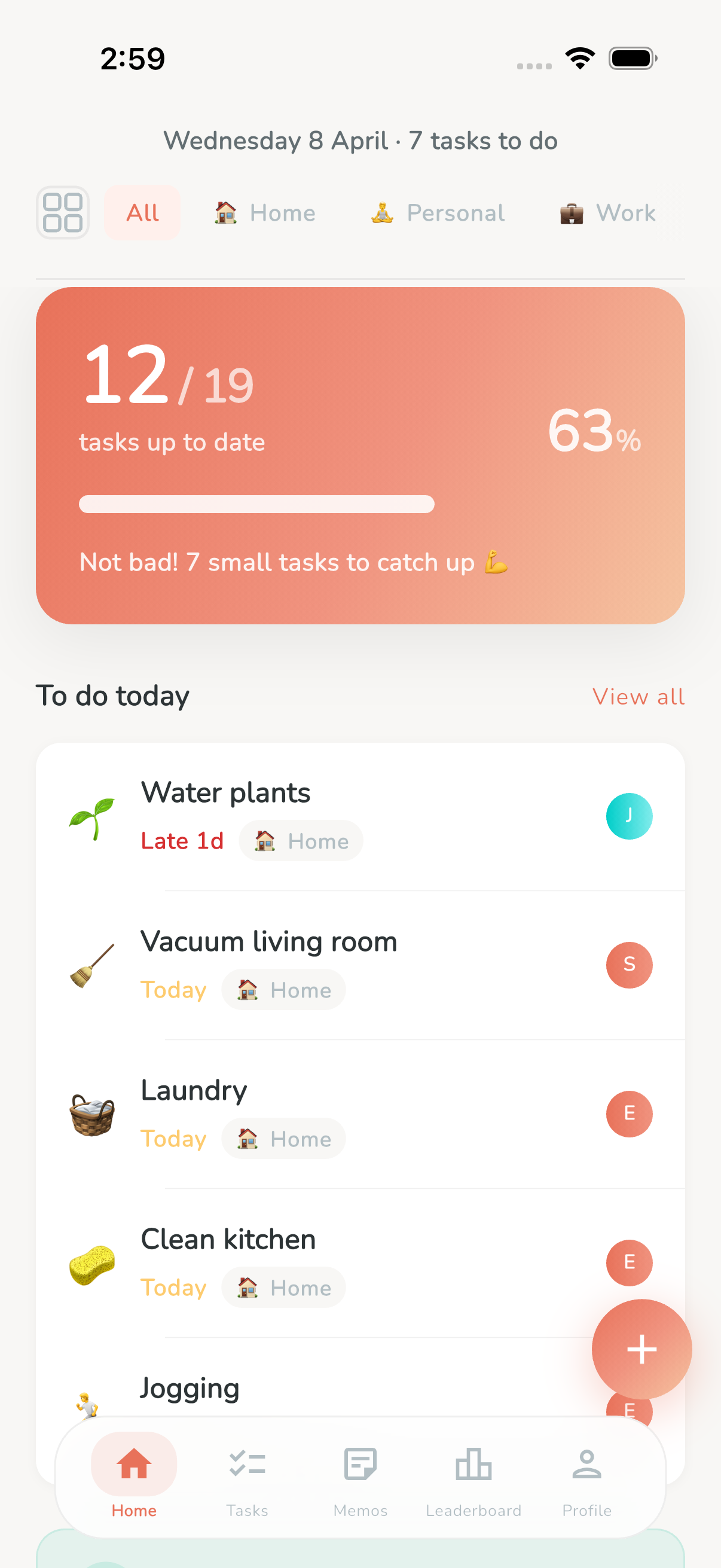
One list, everyone on the same page
In most households, chores live in someone’s head. One person tracks what needs doing, reminds everyone else, and ends up doing most of it themselves. It’s exhausting, unfair, and leads to tension. Bobby fixes this by making tasks visible, shared, and trackable.
A shared list in Bobby is a collection of tasks — recurring or one-time — that multiple people can see and complete. Create a list called "Apartment Chores" or "Family Tasks," invite your people, and suddenly everyone can see exactly what needs doing, when it’s due, and who’s been doing what.
No more group chat reminders. No more sticky notes on the fridge. No more passive-aggressive "Did you remember to..." texts. Bobby becomes the single source of truth for your shared responsibilities.
Flexible roles
The right permissions for everyone
Not everyone needs the same level of control. Bobby’s role system lets you decide who can create tasks, who can just complete them, and who manages the list.
Owner
The person who created the list. Full control over everything — create tasks, edit tasks, manage members, change roles, or delete the list entirely.
- ✓ Create and edit tasks
- ✓ Manage members and roles
- ✓ Delete the list
Admin
Trusted members who help manage the list. Admins can create and edit tasks, invite new members, and keep things organized — everything except deleting the list.
- ✓ Create and edit tasks
- ✓ Manage members
- ✗ Cannot delete the list
Member
The default role for anyone who joins via an invite link. Members can view all tasks, complete them, and be assigned — but cannot create or edit tasks.
- ✓ View and complete tasks
- ✓ Be assigned to tasks
- ✗ Cannot create or edit tasks
Assign tasks, see who did what
Every task in a shared list can be assigned to one or more members. Assign "Vacuum the living room" to your partner, "Walk the dog" to your teenager, or leave "Take out the trash" unassigned so anyone can grab it. Avatars on each task show at a glance who’s responsible.
When someone completes a task, everyone in the list sees it immediately. Bobby syncs in real time — the task’s urgency bar resets, the completion is logged, and the next due date is calculated automatically. No need to report back or check in. The list updates itself.
You can also create private lists just for yourself. Bobby works equally well for personal routines, solo projects, or anything you don’t want to share. Mix and match shared and private lists — Bobby handles both seamlessly.
For every team
Shared lists for every situation
Whether you live with family, roommates, or a partner — Bobby adapts to your group dynamics.
Family chores
Create a "Home" list with recurring tasks: vacuuming, laundry, dishes, lawn mowing. Assign tasks to family members and let the leaderboard add a touch of friendly competition. Kids love earning points — and you’ll love not having to nag.
Couple’s to-do
Split household responsibilities fairly. Bobby makes the invisible labor visible — both partners see exactly what has been done and what’s coming up. No more mental load imbalance.
Roommate rotation
Share an apartment? Create a list for common areas. Bobby tracks who cleaned the bathroom last, when the kitchen is due for a deep clean, and whose turn it is to take out the trash. Accountability without awkward conversations.
Small team tasks
Bobby isn’t just for home. Use it for recurring team tasks: weekly reports, server maintenance, inventory checks, plant watering at the office. Simple, visual, and zero learning curve.
Getting started
Share a list in seconds
Inviting someone to your list is as fast as sending a link. No sign-up required for them either.
Create a list
Give it a name, pick an emoji, and add your first tasks.
Tap share
Generate an invite link or a QR code from the list settings.
Send the link
Share it via text, email, AirDrop, or any messaging app.
They’re in
They tap the link, open Bobby, and instantly join your list. Done.
Ready to share the load?
Download Bobby for free and create your first shared list. Invite your family, roommates, or partner in seconds. No account required.